A Professional's Take on the New Instax Mini Link 2
Introduction
The Instax Mini Link 2 arrives in a crowded but evolving market for pocket-sized photo printers aimed at casual photographers, event hosts, and people who value tangible prints in a digital-first world. This article examines the Mini Link 2 from a practical, professional perspective: how it performs, who benefits most from it, what trade-offs buyers should expect, and how it compares with alternative portable printers. The intent is to help prospective buyers weigh real-world considerations—print quality, ease of use, mobile app functionality, running costs, and durability—before making a decision.
Overview of the Instax Mini Link 2
The Instax Mini Link 2 is a compact Bluetooth thermal-exposure printer designed to produce credit-card–sized instant prints using Fujifilm's Instax Mini film. It targets social users who want tactile prints from smartphone images, hosts and creatives who need quick physical keepsakes at gatherings, and hobbyists who appreciate the aesthetic of analog instant photos without owning a film camera. The Mini Link 2 builds on the original Mini Link platform, focusing on usability, faster workflows, and expanded creative options delivered through its companion mobile app.
Design and Build
Physically, the Mini Link 2 aims for portability and approachable styling. The unit is small enough to fit in a bag or large jacket pocket and is light enough to be passed around at events without fatigue. The housing material feels durable for everyday consumer handling; it is plastic-forward but robustly finished. Controls are minimal—power and a single print button—intentionally deferring control to the smartphone app for image selection, layout, and creative modes.
Portability and Ergonomics
For event photographers and casual users, portability matters. The Mini Link 2 is designed to be taken to parties, weddings, and travel. Its footprint is compact and predictable: it sits comfortably on a tabletop when used as a guestbook-style printer and slips easily into a daypack. The simplicity of the hardware keeps the learning curve low, which is valuable when multiple people will use the device in a single session.
Printing Performance and Output Quality
Prints from the Mini Link 2 carry the characteristic look of Instax Mini film—saturated colors, high contrast, and a distinct tactile finish. That aesthetic is part of the appeal: users typically appreciate the analog imperfection and warmth of these prints rather than strict photographic fidelity. The printer reproduces skin tones and warm hues reliably, though fine shadow detail and extremely high-contrast scenes can lose subtlety. Expect prints that favor pop and immediacy over accuracy and nuance.
Speed and Reliability
In everyday use the Mini Link 2 is responsive. Once the image is confirmed in the app and the print command is sent, the printer processes and produces a single Instax Mini print in a matter of seconds. Reliability is solid for routine shoots and social events; paper jams are uncommon when using genuine Instax film and following the loading instructions. Still, users who need high throughput—printing dozens to hundreds of photos in a single sitting—should plan for film replacement and occasional pauses to let the device cool during heavy use.
Mobile App and Creative Features
The companion mobile app is a central part of the Mini Link 2 experience. Most of the device's advanced functionality lives inside the app: image editing, layout selection, filters, frame templates, and party modes where multiple devices can contribute to a shared print session. The app provides a straightforward workflow for cropping and framing images to the Instax Mini aspect ratio and includes creative overlays and text options for personalization.
For buyers who care about creative flexibility, the app is often the deciding factor. It enables pulling frames from recent camera-roll shots, extracting a favorite frame from video, and composing collages. The app also manages firmware updates, which can add features or improve compatibility—an important advantage in a product class where manufacturer support differentiates the long-term user experience.
User Experience and Interface
The interface leans toward intuitive iconography rather than dense menus, which is ideal for casual users and in-the-moment printing. However, professionals who prioritize granular color control or advanced pre-print adjustments may find the app's editing tools limited compared with dedicated photo-editing software. The app's strength is in speed and simplicity, not in advanced color correction or prepress controls.
Find top-rated Electronics products at great prices.
Shop Amazon →Connectivity and Setup
Connection between a smartphone and the Mini Link 2 is achieved via Bluetooth pairing. The initial setup is quick: enable Bluetooth, launch the app, and pair the device. Stability during printing sessions is generally good, though like any Bluetooth device it performs best when the phone remains nearby with minimal radio interference. Users who frequently switch between multiple devices (different phones or tablets) should expect to re-pair or toggle connections occasionally.
Battery Life and Charging
The Mini Link 2 uses an internal rechargeable battery. For many users, a single charge will cover a typical event or outing. The device charges via a standard USB interface, which makes topping up convenient using portable power banks or laptop ports. Buyers who plan to use the printer for all-day events should consider carrying a small power bank or a spare charged battery (if a removable battery option exists on their variant) to avoid downtime during extended print sessions.
Film, Running Costs, and Maintenance
Instax Mini film is available in multiple pack sizes and finishes, and the film choice is a major ongoing cost to consider. Each print has a fixed per-print cost driven by the film price; therefore, buyers who print frequently should estimate monthly or event-based expenditures. Compared with continuous-toner or dye-sublimation printers intended for larger prints, the per-print cost is relatively high—acceptable for keepsakes, less so for bulk printing.
Maintenance is minimal: keep the print exit clear, use genuine film to minimize error rates, and occasionally clean the print head area as recommended. Since the printer uses physical film, there is no need for ink replacement, but film storage conditions (cool, dry) affect reliability and print stability over time.
Real-World Use Cases
- Event keepsakes: Wedding photographers and party hosts can hand guests instant prints as souvenirs. The tactile format is ideal for signing and guestbook-style displays.
- Travel mementos: Travelers enjoy printing a few highlights each day for travel journals or scrapbooks. The compact size makes it suitable for trips where carrying a full printer or photo equipment is impractical.
- Social creatives: Social media content creators and hobbyists use the printer to turn digital content into physical artifacts for giveaways, mailers, or studio props.
- Education and workshops: Teachers and workshop leaders use it for hands-on activities where instant feedback and a physical output enhance engagement.
Pros & Cons
Pros
- Compact, lightweight design well-suited for events and travel
- Produces the characteristic Instax Mini look that many users find appealing
- Intuitive mobile app with creative templates and party modes
- Minimal maintenance—no ink cartridges to replace
- Quick setup and straightforward Bluetooth connectivity
Cons
- Higher per-print cost compared with larger-format or ZINK printers
- Limited granular color controls in the app for advanced users
- Small print size restricts use where larger prints or fine detail are required
- Bluetooth pairing can be mildly inconvenient when switching devices frequently
- Throughput limits for high-volume printing sessions without periodic breaks
How the Mini Link 2 Compares (At-a-Glance)
The following table compares the Instax Mini Link 2 with a couple of typical alternatives in the portable printer space to highlight the different trade-offs buyers should weigh. The comparison emphasizes the buyer-focused attributes that matter in everyday scenarios.
| Feature | Instax Mini Link 2 | Instax Mini Link (original) | Compact ZINK Pocket Printer |
|---|---|---|---|
| Print media | Instax Mini film (physical instant film) | Instax Mini film (physical instant film) | ZINK (zero-ink) paper |
| Print size | Instax Mini (credit-card) | Instax Mini (credit-card) | Credit-card or slightly larger depending on model |
| Image look | Saturated, analog instant aesthetic | Saturated, analog instant aesthetic | Smoother tones; more photo-realistic depending on paper |
| Connectivity | Bluetooth (smartphone app) | Bluetooth (smartphone app) | Bluetooth or NFC (varies by model) |
| Creative app features | Strong: templates, collages, party modes | Moderate: basic templates and editing | Basic editing and borders; less film-like styling |
| Running cost | Higher per print (instant film) | Higher per print (instant film) | Lower to moderate per print (ZINK paper) |
| Best for | Users who want authentic instant film look and tactile keepsakes | Budget-minded users wanting basic instant film prints | Users who prioritize lower per-print cost and more realistic color |
Buying Guide: What to Consider Before Purchasing
Choosing an instant pocket printer is as much about lifestyle and use patterns as it is about specs. The following guide outlines the practical factors potential buyers typically care about and how the Instax Mini Link 2 measures up against those priorities.
1. Intended Use and Print Volume
Consider how many prints will be required per event or week. For occasional snapshots and keepsakes, the per-print cost of Instax film is manageable and often worth the distinct aesthetic. For high-volume needs—such as print-heavy photo booths or constant giveaways—the recurring cost and film replacement intervals become significant. The Mini Link 2 excels at casual to moderate volumes, not industrial throughput.
2. Desired Print Aesthetic
If the buyer values the iconic instant-photo look—warm saturation, vignette potential, and a tangible white border—the Instax system is designed specifically for that. If color accuracy and fine detail are the primary goals, consider alternatives that use dye-sublimation or ZINK technologies which can produce more faithful reproductions of digital images.
Find top-rated Electronics products at great prices.
See Deals →3. Portability vs. Functionality
The Mini Link 2 prioritizes small form factor and ease of transport. If a buyer needs larger prints or advanced editing features on-device, a larger printer or hybrid solution may be more appropriate. For on-the-go social use, the Mini Link 2’s balance of portability and features is compelling.
4. App Experience and Compatibility
Examine the companion app for the creative controls that matter: templates, collage-making, frame extraction from video, and firmware updates. The smartphone platform—iOS or Android—should be supported, and the buyer should check minimum OS version requirements if using an older device.
5. Cost of Consumables and Long-Term Ownership
Film packs come in standard sizes. Buyers should calculate approximate monthly spend based on expected printing habits. Also consider storage of film (avoid heat and humidity) and availability in local markets, particularly if traveling internationally.
6. Durability and Warranty
Check the manufacturer’s warranty and local service options. For devices that will see frequent transport and communal use, a robust warranty and accessible customer service become more valuable.
Practical Tips for Getting the Most from the Mini Link 2
- Preselect and lightly edit images on the phone before connecting to the printer to speed up event workflows.
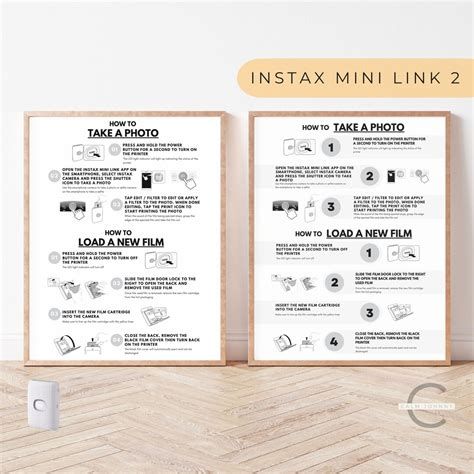
- Carry spare film packs and a small power bank for extended sessions to avoid interruptions.
- Experiment with the app’s creative modes ahead of high-pressure events so the process is familiar for guests.
- Store film in a cool, dry place and allow film to acclimate to room temperature before printing in cold environments.
- Use genuine Instax film to reduce the chance of jams or inconsistent development results.
Conclusion
The Instax Mini Link 2 is a well-considered evolution in Fujifilm’s line of compact instant printers. It delivers on the core promises that draw buyers to instant film: immediate, tactile prints with a distinctive look, a lightweight design suited for social settings, and a simple user experience mediated by a creative mobile app. For buyers who value the analog instant aesthetic and who print moderate quantities—event hosts, travelers, and social creators—the Mini Link 2 is a strong, user-friendly option.
That said, the product is not a catch-all solution. The small print size and ongoing film cost make it less suitable for high-volume needs or situations where photographic precision is critical. The app’s editing features prioritize speed and fun over fine-tuning, which aligns with the product’s social-first positioning. Ultimately, the Instax Mini Link 2 is best viewed as a tool for creating memorable, shareable physical artifacts quickly and enjoyably—an instant-print companion for the digitally native who still values a printed memento.